Local-first Mac app · One-time purchase

Your budget.
Your Mac.
Your data.

A personal budget tracker with no cloud, no account, and no subscription. Everything stays on your machine — always.

Get Spend. for Mac — $29

One-time purchase · No subscription · Free updates · 30-day guarantee

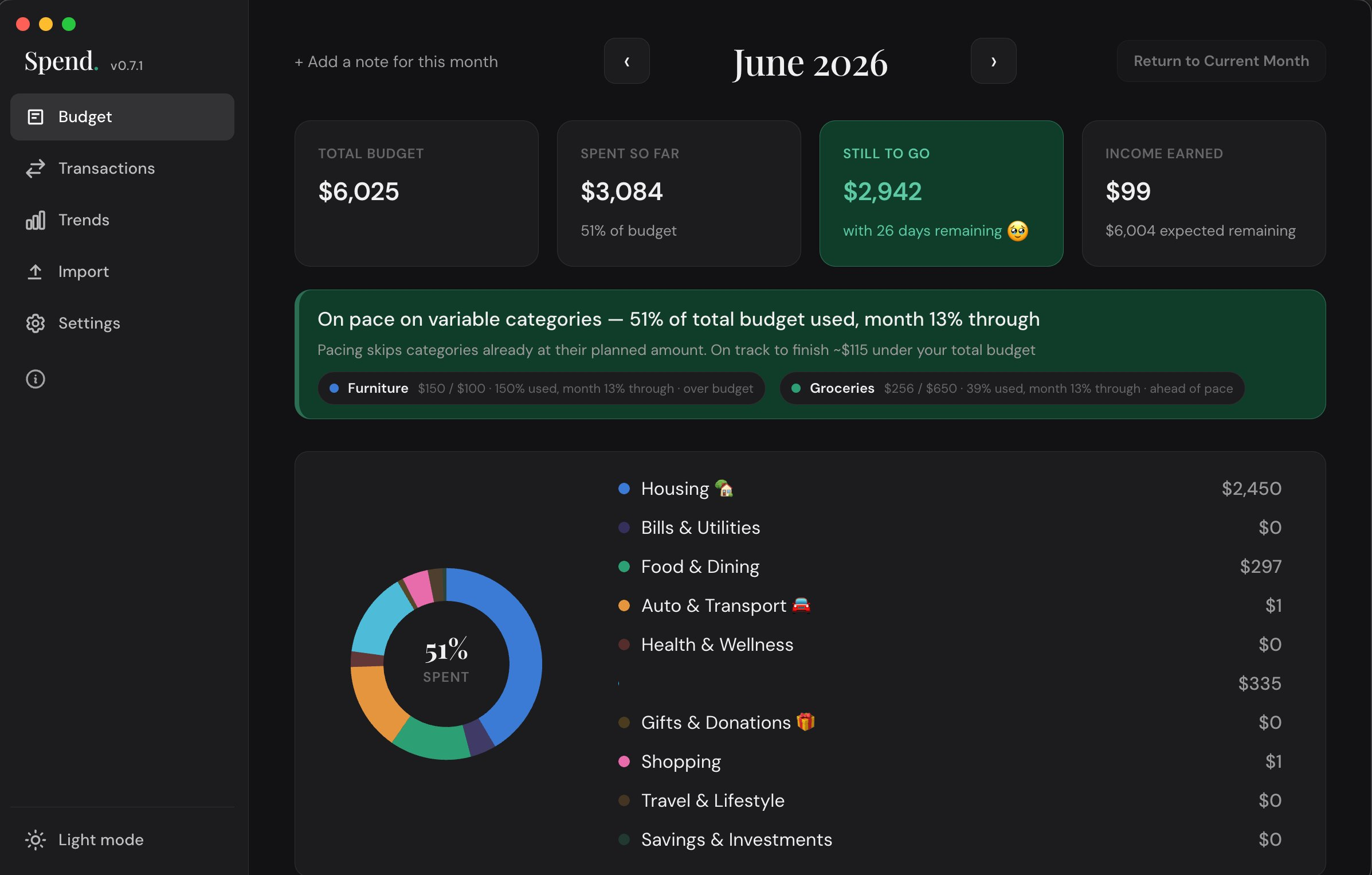
Spend. budget dashboard
Imports from 17+ banks and finance apps
ChaseBank of AmericaWells FargoCapital One Apple CardCitiDiscoverAmex MonarchYNABRocket MoneyQuicken CopilotMint
Features

Everything you need, nothing you don't

Built for people who want to actually understand where their money goes.

Monthly dashboard

See your total budget, spending, and remaining at a glance. A pace tracker warns you if you're running hot before the month ends.

Smart CSV import

Drop a CSV from your bank. Spend. learns your category mappings so future imports are one click. Works with 17+ formats.

Spending trends

Month-over-month charts show where your money goes, how income compares to budget, and your net position over time.

Merchant insights

Search any merchant to see your total spend, visit frequency, and average per trip. Know where the money really goes.

Sinking funds

Set a yearly target for irregular expenses — car registration, gifts, vacations. Spend. calculates your monthly set-aside.

Light and dark mode

Beautiful in both. Your budget tracker, your way, on your schedule.

Drill into every category

Click any category to expand a detailed overlay showing each line item, its budget, and how much you've spent. Progress bars shift from green to amber to red as you approach your limit.

Edit budget amounts inline — just click any number and type.

Budget category detail overlay

Every transaction, your way

Browse, search, and filter your full spending history. Expand any row to see the raw bank statement, fix a miscategorized charge, or add a note.

Search any merchant name to see merchant insights — total spent, visit count, and average per trip.

Transactions list with search and filters

See patterns over time

Month-over-month spending charts show how your habits are changing. Spending vs. budget, breakdown by category, income over time, and your monthly net — all in one view.

Click any month to jump directly to that month's budget dashboard.

Spending trends charts
Setup

Up and running in 5 minutes

A guided setup walks you through everything on first launch — no manual required.

Choose your budget categories
1 Choose your categories

Start with sensible defaults or build your own. Fully customizable in Settings anytime.

Import your transactions
2 Import your transactions

Drop a CSV from your bank. Spend. maps categories and remembers for next time.

Set budget amounts
3 Set your budget targets

Spend. suggests amounts based on your actual spending. Accept, adjust, or skip — up to you.

A checklist, not a chore

After setup, a getting-started card lives on your dashboard until you've completed all the basics. Click any item to jump directly to that screen.

Once you're fully set up, it quietly disappears and your budget dashboard takes over.

Getting started checklist on the dashboard
🔒 Your data never leaves your Mac

No cloud. No tracking. No nonsense.

Spend. stores everything in a local SQLite database on your machine. It never connects to the internet. No servers, no analytics, no tracking code of any kind.

Your financial data is yours alone — not a product to be monetized, not a liability to be breached.

Start knowing where your money goes

One purchase. Your budget, under control.

Get Spend. — $29

$29 one-time purchase · No subscription · Free updates
macOS 10.15 or later · Apple Silicon + Intel Mac · 30-day money-back guarantee